-
AuthorSearch Results
-
January 12, 2017 at 12:21 am #106946
In reply to: Full Frame Pro: Can I make the slider unclickable?
Haruyuki
MemberI have added the CSS and observed that I cannot click the slider and open the image anymore in FireFox, but I can still click the slider and open the image in Safari.
My Safari version: Version 10.0.2 (12602.3.12.0.1)
OSX: 10.12.2This is what I have in the Custom CSS Option.
#feature-slider .cycle-prev,
#feature-slider .cycle-next {
display: none;
}#feature-slider,
#header-featured-image {
margin-top: 0;
}#feature-slider .slides a {
pointer-events: none;
}Thank you,
YukiJanuary 6, 2017 at 1:14 pm #106549In reply to: Full Frame Pro: Can I hide the primary menu?
Mahesh
Member@yuki12345: Go to Dashboard=> Appearance=> Customize=> Additional CSS box and add the following CSS:
#feature-slider, #header-featured-image { margin-top: 0; }Regards,
MaheshJanuary 6, 2017 at 9:20 am #106522Mahesh
Member@timb: Of course you’ll need Posts. Selecting Categories Slider displays Posts as the slider and use post’s featured image as the slider image. I hope you understand. And where actually have you added the featured image. Let me know further.
Regards,
MaheshDecember 29, 2016 at 9:50 am #106045Mahesh
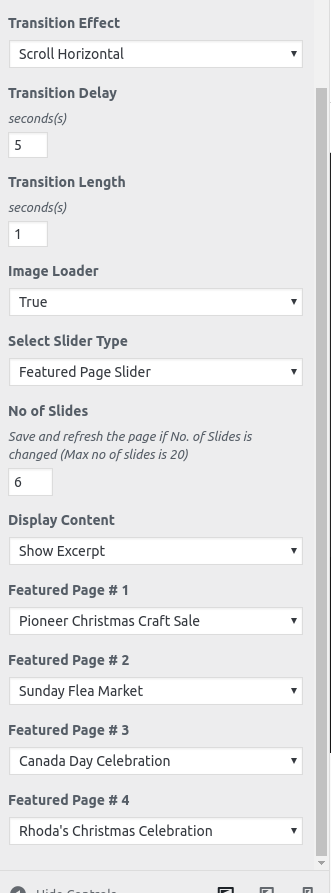
Member@christine_cn: You mean Select Slider Type option is not available when you choose Homepage/Frontpage option? I checked the same on the our server with theme and its working fine. Choosing Homepage/Frontpage option then choosing Featured Page Slider in Select Slider Type. Same with Featured Content too. Let me know further. Its has nothing to do with Free/Pro version. Pro version has more that Page Slider option.
WordPress 4.7
Catch Base 2.9Regards,
MaheshDecember 27, 2016 at 10:51 am #105933In reply to: Widget area to the right of featured content?
Mahesh
Member@kejpa: Just displaying Featured Slider and Featured Content in the front page can be done simply with Custom CSS. But the widget area on the right of the Featured Slider and Featured Content is kinda tricky. You’ll need to create a child theme for this then customize further. I recommend you to hire a customizer.
Regards,
MaheshDecember 26, 2016 at 9:23 am #105898In reply to: Need Help on Lucida Pro Customisation
Mahesh
MemberQ.The “Get Listed” Page is coming in next raw. Can you please tell me how can i keep all menu pages together
-> Please clarify, I don’t quite get it.Q.How to add “Next” and 1234567 Button (You can check here – https://catchthemes.com/demo/lucida/)
-> Go to Dashboard=> Appearance=> Customize=> Theme Options=> Pagination Options and select Numeric in Pagination TypeQ.How to add pages below Next Button (You can check here – https://catchthemes.com/demo/lucida/)
-> This is the Featured Content, go to Dashboard=> Appearance=> Customize=> Featured Content and choose Homepage/Frontage Option. Then select the content type you want. in Select Content Type option.Q.How to edit Copyright and other text (You can check here – https://catchthemes.com/demo/lucida/)
Go to Dashboard=> Appearance=> Customize=> Theme Options=> Footer Editor Options and edit the content here.Q.How to edit and add my post on Home Slide Screen (You can check here – https://catchthemes.com/demo/lucida/)
Go to Dashboard=> Appearance=> Customize=> Featured Slider and select Featured Post Slider in Select Slider Type option and provide the Post’s Ids in the boxes below that slides down. (Use this plugin to know post ids https://wordpress.org/plugins/catch-ids/)Q.Instagram account is created and also added 3 images on the same. But those images are not showing on site. (You can check here – https://catchthemes.com/demo/lucida/)
-> Make sure your account is public.Q.How to add Social Profile Content (You can check here – https://catchthemes.com/demo/lucida/)
-> Clarify more on this. If you want to add social links such as Facebook, Twitter, go to Dashboard=> Appearance=> Customize=> Social Links options and add the desired.Q.How to edit Latest News (You can check here – https://catchthemes.com/demo/lucida/)
-> Go to Dashboard=> Appearance=> Customize=> News Ticker and Select any one from the Select Ticker Type option.Q.How to create and design Subscribe to Newsletter as Lucida Pro Demo page is having. (You can check here – https://catchthemes.com/demo/lucida/)
-> Go to Dashboard=> Appearance=> Widgets and add CT:NewsLetter widget to one of your widget area. Then fill in the form by following the steps as you add the widget.Regards,
MaheshDecember 12, 2016 at 12:29 pm #105201In reply to: Featured Slider Loop
Mahesh
Member@edvasquez: Featured Slider stopping, this is not possible simply. You’ll need to customize the theme further for this. And for changing content text size and making it bold, go to Dashboard=> Appearance=> Customize=> Additional CSS:
#slideshow .entry-title { font-size: 50px; font-weight: bold; } #slideshow .subtitle { font-size: 25px; font-weight: bold; }Regards,
MaheshDecember 11, 2016 at 8:18 am #105124Pratik
MemberHi Sami,
Thank you for using Fabulous Fluid theme.
featured grid: There’s a thick white border around my featured grid, on the home page. the images are the recommended dimensions
* I see that you mean. It is to separate two sections when Heading is used. Try following code in Appearance=> Customize=> Additional CSS box:#featured-grid-content, #featured-content { margin-top: 0; }featured slider: images are so massive, but they are the sized to the recommended dimensions so… are there are any other options to making these a bit smaller in height?
For this, you will need to upgrade to Pro. Then you will be able to use any image size you want by using Featured Image Slider. I am afraid apart from that, there is no proper way to change image dimensions.sidebar: i think this problem just started occurring, i dont recall it ever being like this. the sidebar is set about an inch away from the where it normally is, and is showing up “squished” and thin.
The sidebar size looks ok. Check: https://catchthemes.com/demo/fabulous-fluid/blog/, its same here too.Regards,
PratikDecember 8, 2016 at 8:05 pm #104926chrisDug
MemberHi Mahesh
Thank you very much for your reply i was able to fix the slider issue however the promotion headline still does not translate or give me an option to add the translation in customizer. I noticed also that the title for featured content does not translate either. Thank you in advance for the help it is much apreciated!!
Thanks
ChrisDecember 8, 2016 at 10:29 am #104884Mahesh
Member@chirsdug: For this, you’ll need to create a child theme. You can find more details on creating child theme HERE. Then in your child theme’s
functions.php, add the following codes:if ( ! function_exists( 'catchresponsive_child_polylang_invalidcache' ) ) : /** * Template for Clearing Polylang Invalid Cache * */ function catchresponsive_child_polylang_invalidcache() { delete_transient( 'catchresponsive_promotion_headline' ); delete_transient( 'catchresponsive_featured_content' ); delete_transient( 'catchresponsive_featured_slider' ); } // catchresponsive_child_polylang_invalidcache endif; add_action( 'after_setup_theme', 'catchresponsive_child_polylang_invalidcache' );This function is for Promotion Headline for custom language, with give you option to put the desired text for the translation.
function catchresponsive_child_polylang() { if ( function_exists( 'pll_register_string' ) ) { $options = catchresponsive_get_theme_options(); $promotion_headline = $options['promotion_headline']; $promotion_subheadline = $options['promotion_subheadline']; $promotion_headline_button = $options['promotion_headline_button']; $headline = $options ['featured_content_headline']; $subheadline = $options ['featured_content_subheadline']; pll_register_string( 'featured_content_headline', $headline ); pll_register_string( 'featured_content_subheadline', $subheadline ); pll_register_string( 'promotion_headline', $promotion_headline ); pll_register_string( 'promotion_subheadline', $promotion_subheadline ); pll_register_string( 'promotion_headline_button', $promotion_headline_button ); } } add_action ( 'admin_init', 'catchresponsive_child_polylang' );Regards,
MaheshDecember 6, 2016 at 10:45 am #104624In reply to: Fabulous Fluid
Mahesh
Member@roman06: Please add the following CSS instead:
.page-content, .entry-content, .entry-summary, #featured-grid-content .row{ margin: 0 !important; }Main Slider: Which slider type have you chose? If you have Page slider selected, select the pages you want to display as slider and make sure that you the page has featured image set.
How can I add Privacy and Terms page all the way at the bottom footer of the page next to Copywrite?
This feature is only available in Pro version. Or you’ll need to customize it through child theme. I recommend you to upgrade to Pro version.Let me know if any problem.
Regards,
Maheshfilip_1
MemberHi again,
I have one question regarding the featured image.
The featured post slider is linked with the featured image of the each post. I can decide which image(featured image of certain post) should be shown on a featured post slider. But there comes the problem. Image format of a image that is shown on featured post slider is good, but the cropped image of post(this little image that is shown next to the post) is not good.
Is there a way that I could edit the featured image that is displayed in the box next to the post text on the front page.
Site URL : http://www.zupa-bezgresnog-zaceca-bdm.hr/
Thank you for your help.
December 2, 2016 at 10:13 am #104378In reply to: Remove Default slider images
Mahesh
Member@promomusic: For changing Slider image, go to Dashboard=> Appearance=> Customize=> Theme Options=> Featured Slider and choose Image in Select Slider Type option then upload the image.
I checked your site and seems you’ve removed the slider.Regards,
MaheshDecember 2, 2016 at 9:34 am #104377In reply to: Fabulous Fluid
Mahesh
Member@roman06:
1. Please post in your site url.
2. For custom images, I recommend you to upgrade to Pro. It has Custom Featured Slider option so you can put the image you want within the option.
3. Have you set the page as the Posts page?
4. Demo use a static page.
i. Demo Slider
ii. Demo Featured Grid Content
iii. Static Page’s Content
iv. Featured Content
v. Some Footer Widgets
5. I don’t get this, please clarify. The recommended size for slider image is 1680px x 750pxRegards,
MaheshDecember 1, 2016 at 1:17 pm #104297In reply to: Featured Slider – alt="" Tag
Mahesh
Member@marie21: Catch Responsive has Featured Page Slider that uses selected page’s featured image as Slider Image. And automatically it uses Page’s title as title and alt property of
<img>element. If you want to have custom title and alt, I recommend you to upgrade to Pro version. It has Featured Custom Slider featured.Regards,
MaheshNovember 30, 2016 at 10:10 am #104213In reply to: Cannot remove demo slide
Mahesh
Member@jrdphd: Do you want to remove the slider completely? If yes, go to Dashboard=> Appearance=> Customize=> Featured Slider and select Disable in Enable Slider option. Then click Save & Publish.
Hope this helps.Regards,
MaheshNovember 29, 2016 at 10:32 am #104128In reply to: How to set own Featured Content and Featured Slider?
Mahesh
Member@jshrek: This feature (Custom Featured Content / Custom Featured Slider) is only available in Pro version. I recommend you to upgrade to Pro version.
Regards,
MaheshNovember 25, 2016 at 12:24 am #103862In reply to: How to change slider images
Sakin
Keymaster@whiteavenger80: In Featured Post # 1, # 2, #3, you need to add in Post ID. For Post ID, you can refer to plugin Catch IDs https://wordpress.org/plugins/catch-ids/
If you don’t want to add manually IDs, then you can just create category and add in posts in those category and in Slider Type you can select “Featured Category Slider”.
November 20, 2016 at 11:07 pm #103601In reply to: How to change slider images
Sakin
Keymaster@grahama: Please add in your site URL and explain that are you trying to do. When I check in your site http://proencltd.com/, you haven’t added image. For more, check out theme instructions at https://catchthemes.com/theme-instructions/catch-base/#featured-slider
November 15, 2016 at 8:46 pm #103351In reply to: How to change slider images
grahama
MemberSakin, I have uploaded the featured images and when I select the page in slider settings to the featured images on page, > Save > refresh – no images just text over -writing image – no featured image!
Changed back to default – an other option is how can i remove the grey text slider 1 from default slider??
Screen shot is here => https://www.dropbox.com/s/g2kaho05u7rtbfz/error.png?dl=0
-
AuthorSearch Results