Viewing 2 posts - 1 through 2 (of 2 total)
  • Author
    Posts
  • #344283
    Shannon
    Participant

    Need to adjust color and weight of text on right side button in this area; it’s too bland; where to do this please?

    #344287
    minal
    Keymaster

    Hello @shannon:

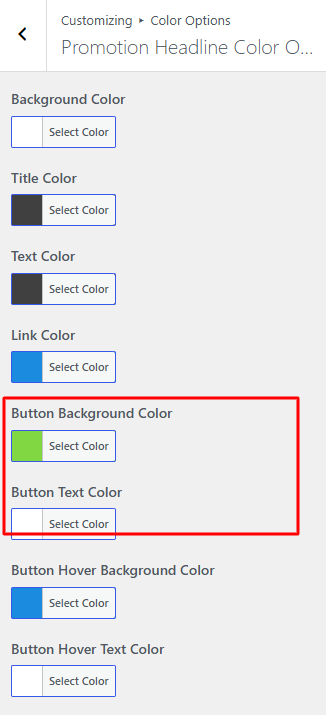
    You can change the button color in the customizer.

    You can refer to the image below for clarification.

    Go to Dashboard > Customizer > Color Options > Promotion Headline Color Options

    promotional

    However, we don’t currently have an option to change the font weight in the Customizer. To change the font weight, you’ll need to add custom CSS under Additional CSS.

    Go to Dashboard > Customizer > Additional CSS and add the code below.

    
    .promotion-button {
       font-weight: 700;
    }
    

    You can change the value of your choice.

    Sincerely,
    Minal

Viewing 2 posts - 1 through 2 (of 2 total)
  • You must be logged in to reply to this topic.