Forum Replies Created
-
AuthorPosts
-
 SakinKeymaster
Hi Hi Richard,
If you want to make it to the whole page width then you need to give background color to the header. So, remove the previous CSS and then add the following CSS
.site-header {
  background-color: #38b6ff;
}
It’s strange why your menu on iPad is behind the content, please add the following CSS:
.site-header {
  z-index: 101;
}
Regards,
SakinSakinKeymasterHi Richard,
You can change the color code in the following CSS as per your need and add it in “Appearance => Customize => Additional CSS” to change the background color of the menu on the desktop.
@media screen and (min-width: 75em) {
	.navigation-classic #primary-menu-wrapper .menu-inside-wrapper {
		background-color: #eeeeee;
	}
}
Regards,
SakinSakinKeymasterHi @khawaja77: You don’t need Catch Updater now. You can just activate your license key and update your site. Please check the instructions at https://catchthemes.com/faq/how-do-i-upgrade-to-a-new-theme-version-if-i-have-modified-my-theme/.
SakinKeymaster@jus10hand : It’s because you have added link as
https://discord.gg/KJSy9fBeMabut it need to behttps://discord.com/invite/KJSy9fBeMaSakinKeymaster@jj-weller777 : Your site is working fine when I view it.
SakinKeymaster@jj-weller777 : I just checked your site and see that you have done a lot of customization in the earlier version. Did you make all the custom codes inside the theme folder ‘globetrotter’?
SakinKeymasterHi Bruce,
The issue has been fixed and you were talking about Fixed Header Logo which you can change it from “Appearance => Customize => Fixed Header Options”.
Regards,
SAkinSakinKeymasterHi Bruce,
It’s showing 1 car in your site Logo. I see https://colonialautorepairservices.com/cars/wp-content/uploads/2023/08/cropped-NEW-COLONIAL-LOGO.png. Can you send me the screenshot of your Logo at “Appearance => Customize => Site Identity”.
Regards,
SakinSakinKeymaster@jessicamorante : Please check this update instructions at https://catchthemes.com/faq/how-do-i-upgrade-to-a-new-theme-version-if-i-have-modified-my-theme/
September 19, 2023 at 4:02 am in reply to: countdown numbers act like they are being squished #325255SakinKeymaster@jus10hand: It’s because of the large font and size. Please add the following CSS in the “Appearance => Customize => Additional CSS” box:
@media only screen and (min-width: 103.75em) { #clock > .count-down .countdown-number, #countdown-section .countdown-number { font-size: 42px; } }SakinKeymasterHi Per Nymo,
You can install plugins like “Header Enhancement” which will enable Customizer with the Site Identity to add Site Icon.
Regards,
SakinSeptember 19, 2023 at 2:45 am in reply to: Which file am I looking for? or is there another solution? #325246SakinKeymaster@catwingz: We don’t have a WooCommerce template in the High Responsive theme. So, I assure you that it’s not from our theme. Please check your WooCommerce settings and also other replated plugins for that.
SakinKeymaster@jj-weller777 : It looks like you have a configuration issue in LiteSpeed Cache plugin. So, please check the settings, clear your cache, and check it.
SakinKeymaster@jus10hand : Please update to the latest version 1.2.9
SakinKeymaster@jessicamorante : Please update to the latest version for updated icons.
SakinKeymasterHi Jeff,
Yes, you can do that. For that just go to “Appearance => Customize => Menus” and then click on your Social Menu and open the link that you want to open in a new tab, in that link check “Open link in a new tab” and click on “Publish”.
Regards,
SakinSakinKeymasterHi Jeff,
You need to active your license key on your site and then update the theme from your dashboard. Please check this instructions at https://catchthemes.com/faq/how-do-i-upgrade-to-a-new-theme-version-if-i-have-modified-my-theme/
Regards,
SakinSakinKeymasterHi Issac,
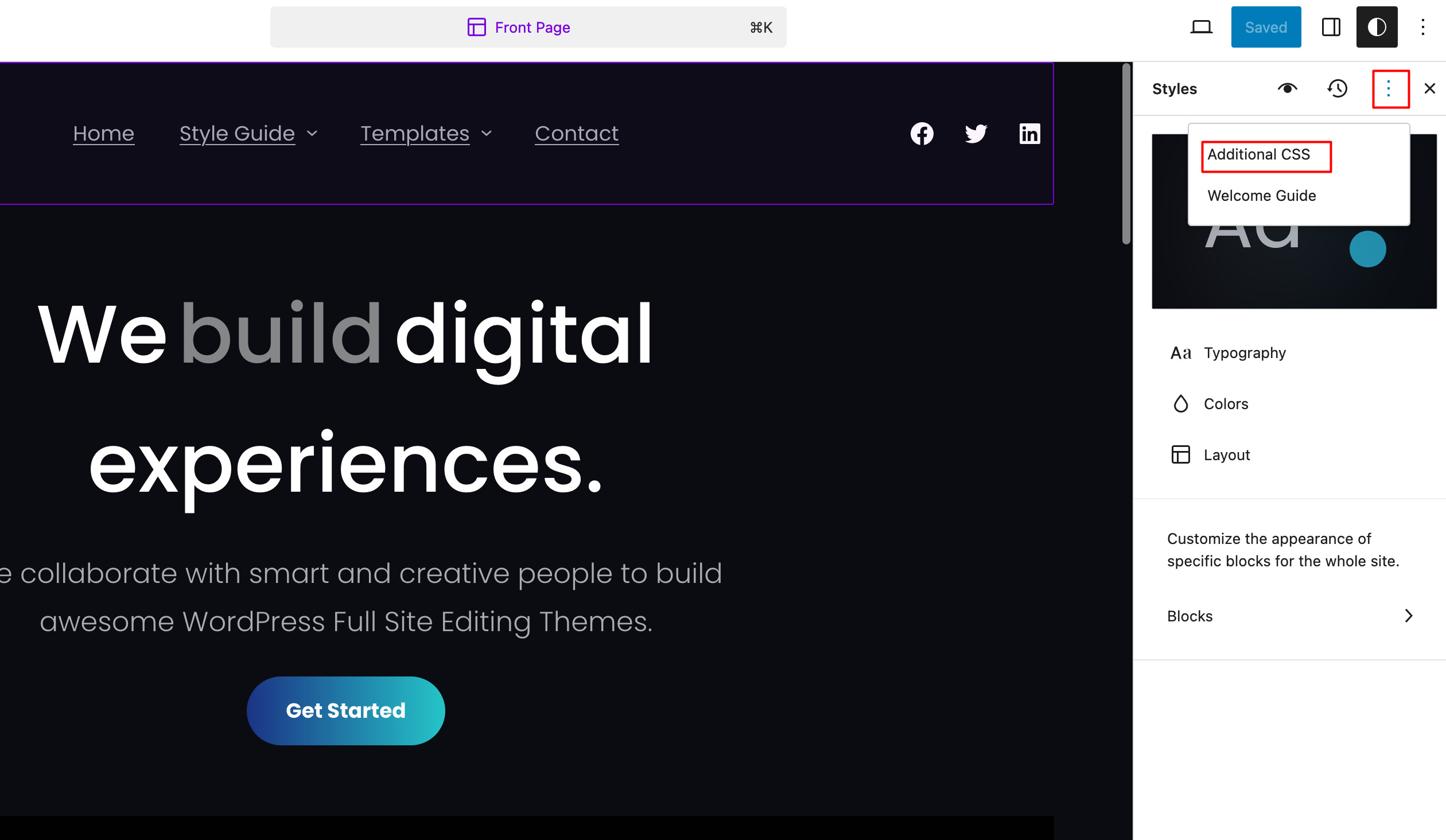
For block themes, yes you can add Custom CSS from “Appearance => Editor => Styles” and then Click on the three dots icon on Style Panel and click on “Additional CSS”.
See this image for the Style Panel:

Regards,
SakinSakinKeymasterHi Jeff,
We have just updated the My Music Band Pro to include the TikTok icon. So, please update the theme and clear your browser cache and chceck it.
Regards,
SakinSakinKeymasterHi Dragos,
The color options are there in the Pro version. So, I recommend you upgrade to the pro version for more color options as well as other features. You can check the compare table at https://catchthemes.com/themes/visanti-pro/#compare
1. For Header Media Title:
You can change the color code in the following CSS and add it in the “Appearance => Customize => Additional CSS” box:.has-header-image .custom-header-content .section-title { color: #111111; }2. For Header Media Subtitle
You can change the color code in the following CSS and add it in the “Appearance => Customize => Additional CSS” box:.has-header-image .custom-header-content .section-subtitle { color: #0b57e3; }3. For the submit button on the contact page.
You can change the background color and color code in the following CSS and add it in the “Appearance => Customize => Additional CSS” box:.entry-content .wpcf7-form input[type="submit"] { background-color: #0b57e3; color: #ffffff; }Regards,
Sakin -
AuthorPosts