

Forum Replies Created
-
AuthorPosts
-
 sujapatiKeymaster
It looks like the submenu links are inheriting different text colors depending on the parent menu item styling.
Please go to Edit Site and select the Navigation section in the header. From there, you will find the Styles settings where you can adjust the navigation menu text color and background color or you can reset the color to get the original theme color.
Please see the attached reference image below for guidance.
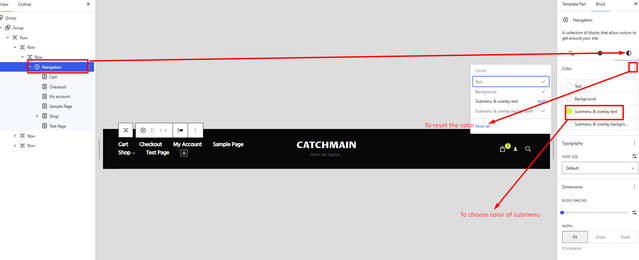
Feel free to let us know if you need any further assistance — we’ll be happy to help.
Regards,
SujapatisujapatiKeymaster@Frankyw. Thank you for reporting the issue. It appears that the misalignment of the portfolio image and title is caused by a CSS conflict. Please add the following CSS to your site, and it should resolve the issue.
.section-content-wrapper.portfolio-content-wrapper,
.site-content .content-area .portfolio-content-wrapper .ect .post-thumbnail {
    padding-bottom: 0;
    width: 100%;
}

.portfolio-entry-content.entry-content:empty,
.site-content .content-area .portfolio-content-wrapper .portfolio-entry-header {
    margin: 0;
}
Let us know if the issue persists, and we’ll be happy to assist further.
Regards,
SujapatisujapatiKeymasterHello @donna:
We’re not completely sure what issue you’re experiencing. Could you please share a screenshot or provide a more detailed explanation of what you’re trying to achieve?
If you’re referring to the image displayed above the content, you can try using the following CSS. Feel free to adjust it as needed.
.site-content .content-area .post-thumbnail { width: 100%; }sujapatiKeymasterGlad to hear that the issue has been resolved!
If you run into anything else, feel free to reach out—we’re always here to help.
Regards,
SujapatiMarch 28, 2026 at 11:12 am in reply to: Abletone homepage slider not working after WordPress update: #342807sujapatiKeymaster@Luke: Sorry to hear that you’re experiencing issues with the slider on your site.
We have tested the Abletone theme on our end with the latest version(ie, 6.9.4), and the slider is working smoothly. All of our themes are regularly updated to ensure compatibility with the latest version of WordPress.
Since you’ve already enabled the slider and cleared the cache, the issue might be caused by a plugin conflict. We recommend temporarily disabling your plugins one by one to identify if any of them are causing the problem.
Please let us know how it goes, and we’ll be happy to assist you further.
Regards,
SujapatisujapatiKeymaster@Andrew:
It would be helpful to check for any plugin conflicts by temporarily disabling other plugins and testing the issue again.
As this seems to be related to the Bandsintown plugin rather than the theme, we recommend contacting their support team for further assistance.
Regards,
SujapatiMarch 27, 2026 at 12:40 am in reply to: Rockstar Pro Update to 3.1 breaks the menu and icon for right scroll gone #342796sujapatiKeymaster@Tansenn:
It looks like your site is using Elementor, which is likely causing the issue. Our theme includes Font Awesome version 6.7.2, and this version may not be fully compatible with Elementor at the moment. As a result, some icons may not display correctly on your site.To resolve this, you can try adding the following CSS:
.social-navigation a:before,
#feature-slider .cycle-prev::before,
#feature-slider .cycle-next::before,
#logo-section .cycle-prev::before,
#logo-section .cycle-next::before,
#to_top_scrollup,
#scrollup,
.posted-on a::before,
.byline a::before,
.cat-links span+a::before,
.tags-links span+a::before,
.comments-link a::before,
.edit-link a::before,
.fa-collapse:before,
.fa-solid:before,
.fa-brands:before,
#promotion-section .button.play-button:before,
.pagination .prev span:before,
.pagination .next span:after,
.gallery-item .gallery-icon a:after,
.tiled-gallery .tiled-gallery-item a:after,
.comment-meta .comment-permalink:before,
.site-header-cart .cart-contents:before,
.mejs-button button:before,
.audioman-mejs-container.mejs-container .mejs-button button:before,
.nav-next .nav-subtitle:after,
.nav-previous .nav-subtitle:before,
.cat-links span + a:before,
.tags-links span + a:before,
.wp-custom-header-video-button:before,
.search-toggle:before, .menu-toggle:before,
.menu-toggle-close:before,
.main-navigation .menu-item-has-children > a:after,
.main-navigation .page_item_has_children > a:after,
.dropdown-toggle:after, .search-submit:before,
#feature-slider-section .cycle-prev:before,
#feature-slider-section .cycle-next:before,
#testimonial-content-section .cycle-prev:before,
#testimonial-content-section .cycle-next:before,
.entry-breadcrumbs a:after,
.comment-reply-title small a:before, #scrollup:before {
    font-family: "FontAwesome" !important;
    font-weight: 900;
}
.social-icons .font-awesome {
    display: inline-block;}
Go to Dashboard → Appearance → Customize → Additional CSS.
Paste the provided CSS code into the Additional CSS field, and the issue will be resolved.Regards,
SujapatisujapatiKeymaster@Andre: It seems your query has been posted twice. We’ve already provided you with the solution on your last thread. Please have a look there.
Regards,
SujapatisujapatiKeymaster@Andre: We just want to clarify your requirement to ensure we provide the correct solution. When you mentioned placing a padlock icon behind the menu text, do you mean you just want to show a lock icon as a subtle badage before the menu? Please add the CSS code to your site.
@media screen and (min-width: 64em) {
  .site-header ul#primary-menu:before {
      content: "\f023";
      font-family: "FontAwesome";
      position: absolute;
      top: 17px;
      transform: none;
      opacity: 0.3;
      font-size: 14px;
      pointer-events: none;
      left: 7px;
  }
}
Please let us know if that is what you are looking for.
Regards,
SujapatisujapatiKeymaster@Adrew: For your first question, the slider content seems to be overlapping the header due to the larger amount of content added. You might want to reduce the text so it fits nicely within the available space, or adjust the heading font size as shown in the image below.

For your second question, it looks like the Query Loop is currently set to display 2 items per page. You can update this to 3 items, as shown in the screenshot below.
Regards,
SunilsujapatiKeymaster@Andrew:
No worries at all — you can do this from the Site Editor. Open the editor, find the Site Title in the header, click on it, and you’ll be able to replace the text or switch it to a logo. Once done, make sure to save your changes. I’ve attached the screenshot for reference.
Please feel free if you need any further assistance.
Regards,
SunilMarch 2, 2026 at 7:06 am in reply to: Some things have changed after update to catch-kathmandu-pro.5.4.1 #342729sujapatiKeymaster@Laura:
We have not made any changes to the buttons or color settings. You can review the changelog here: https://catchthemes.com/themes/catch-kathmandu/#changelog.The theme has only been updated to ensure compatibility with the latest version of WordPress. We have thoroughly tested it on our server, and everything appears to be working correctly.
Kindly check whether any of your installed plugins or settings might be causing changes or conflicts on your site.
Regards,
SujapatisujapatiKeymaster@poassonpanay: Glad to know that. The ticket has been closed.
Regards,
SujapatisujapatiKeymasterHello @zenkeran,
Please try adding the following CSS code to disable the titles in all the pages. Please go to Dashboard > Appearance > Customizer > Additional CSS.
.custom-header .entry-header .entry-title {
    display: none;
}
Please kindly let me know if the code was helpful. Thank you.
Regards,
SujapatisujapatiKeymaster@dward1958: Thank you for bringing this issue to our attention. You will receive a theme update shortly. Once you update the theme, the issue will be resolved.
Kind Regards,
SujapatisujapatiKeymaster@gregallen: The 500/400 error during demo import is usually related to server configuration rather than WordPress itself. Sometimes, hosting firewalls or security plugins may block the demo import request. Please temporarily disable any security plugins if you have and try again.
Additionally, since you’ve upgraded to PHP 8.3, try switching PHP temporarily to 8.0 or 8.1 to check compatibility issues.
Regards,
SujapatisujapatiKeymaster@Marcel: Glad to know that. Please feel free to reach out anytime if you ever need help.
Regards,
SujapatisujapatiKeymaster@kodendigital:
Sorry for the inconvenience. As mentioned earlier, we haven’t made any huge changes on the theme that would cause this issue in your theme.Have you checked with your hosting provider? Since some items are missing in Elementor, we also recommend contacting the Elementor support team. Additionally, this could be caused by a conflict with another plugin.
Regards,
SujapatisujapatiKeymaster@gregallen: Thanks for the query. We have conducted the testing on our server and everything is functioning properly. All the files are imported successfully. It might be server issue at your end. Please check it once.
Regards,
Sujapati -
AuthorPosts


