Tagged: 

Viewing 7 posts - 1 through 7 (of 7 total)
  • Author
    Posts
  • #343407
    Marcel Tujetsch
    Participant

    Font and font size of menus and sliders:
    How can I reduce the font size of a specific menu? Currently, this refers to the top menu.

    How can I set the font for the menus? Currently, the font I selected for the titles isn’t being applied.

    How can I set the font in the slider? It isn’t using the same font as the titles.

    Development page: https://zosicefa.myhostpoint.ch

    #343409
    sujapati
    Keymaster

    @Marcel :  Thanks for the  query. To reduce the font size of the top menu on your site, please add the following CSS under Customizer → Additional CSS:

    .site-primary-menu ul li a {
        font-size: 14px;
    }
    

    You can adjust the font size value as needed.

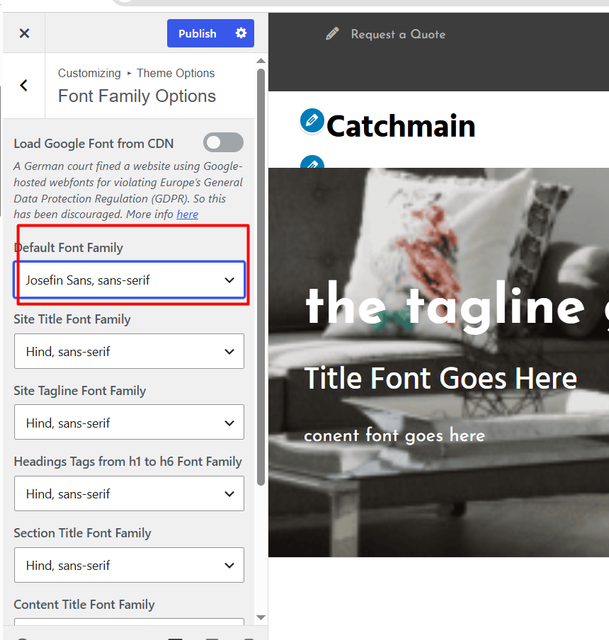
    Regarding the font family for the menus, the menu font does not inherit the font family settings used for content titles or section titles. Instead, it uses the theme’s Default Font Family setting. You can change it from: “Customizer → Theme Options → Font Family Options → Default Font Family ”

    Please refer to the screenshot below for reference.
    image

    As for the Featured Slider, it also uses the same default font family setting mentioned above. Therefore, changing the “Default Font Family” will affect both the menu and the slider text. Please see the screenshot below for more details.

    Please feel free if you need any additional help.

    Regards,
    Sujapati

    #343412
    Marcel Tujetsch
    Participant

    Everything went great. Thanks for the great service.
    I have to say, catchthemes offers the best service I’ve ever experienced. Kudos to you.

    #343416
    sujapati
    Keymaster

    Hello @Marcel,

    We’re pleased to hear the issue has been addressed successfully. If you’re enjoying the theme and are satisfied with our support, we’d like to ask a small favor: would you consider leaving us a review?

    https://wordpress.org/support/theme/clean-enterprise/reviews/#new-post

    Your feedback helps others understand the quality of support we provide and assists them in making informed decisions. Even a brief review of a sentence or two would mean a great deal to us. Thank you for your support!

    Kind Regards,
    Sujapati

    #343422
    Marcel Tujetsch
    Participant

    I did it. I hope it works.

    A last question about Clean Enterprise:
    How can I add additional metadata to the homepage, which isn’t actually a WordPress page? I usually do this with a meta plugin. This works for all subpages, but I haven’t found a way to do it for the homepage. Is there any way to do this?

    #343424
    sujapati
    Keymaster

    @Marcel: Thanks for the query. You can add metadata manually in your theme by adding the code shown below. However, it is recommended to use a child theme so your changes are not overwritten when the parent theme is updated.

    add_action('wp_head', function () {
        if ( is_front_page() && is_page( 'your-slug' ) ){
            echo '<meta name="keywords" content="homepage">';
        }
    });

    Alternatively, if you are using Catch Web Tools, you can add the meta tag directly from the plugin. Go to “Catch Web Tools => Webmaster Tools” and paste your meta tag in the appropriate field under the Webmaster Tools tab, then save the changes.

    Best Regards,
    Sujapati

    #343427
    Marcel Tujetsch
    Participant

    All right, sorry, I missed that. Very well-designed feature. Catch Webtools👍

Viewing 7 posts - 1 through 7 (of 7 total)
  • You must be logged in to reply to this topic.