Viewing 2 posts - 1 through 2 (of 2 total)
  • Author
    Posts
  • #343226
    vrleavitt
    Participant

    Hi there, on this page:

    https://martinpage.com/launch/

    If you go to the navigation and hover over ‘History’ for example, the subnav items are all black on black until you hover over them, where they turn green. If you hover over ‘Media’ the subnav items are white on black, until you hover over them until they turn green, which is what I want.

    How do I get all the other subnav items to default to white on black instead of black on black?

    Thank you!


    #343285
    sujapati
    Keymaster

    @vrleavitt:

    It looks like the submenu links are inheriting different text colors depending on the parent menu item styling.

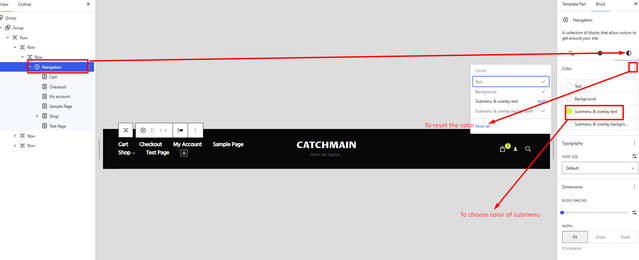
    Please go to Edit Site and select the Navigation section in the header. From there, you will find the Styles settings where you can adjust the navigation menu text color and background color or you can reset the color to get the original theme color.

    Please see the attached reference image below for guidance.

    image

    Feel free to let us know if you need any further assistance — we’ll be happy to help.

    Regards,
    Sujapati

Viewing 2 posts - 1 through 2 (of 2 total)
  • You must be logged in to reply to this topic.