Forum Replies Created
-
AuthorPosts
-
September 3, 2022 at 6:09 pm in reply to: How to remove author and date from posts + how to resize the header media logo #310390
 SakinKeymaster
Hi @kunzibert09:
Thanks for using the Music Journal theme. Nice to hear back from you and glad that my support worked on your website. If it’s not too much trouble, I have a quick request: could you please leave an honest review? https://wordpress.org/support/theme/music-journal/reviews/#new-post . Your review will help others know what to expect when they’re looking for the support I offer. Even a sentence or two would be hugely appreciated.
Thanks, and if there’s anything else at all that I can do to help, don’t hesitate to let me know.
Have a good day! 🙂
Regards,
SakinSeptember 3, 2022 at 2:17 am in reply to: How to remove author and date from posts + how to resize the header media logo #310374SakinKeymasterHi @kunzibert09:
The logo in the Header Video is from “Appearance => Customize => Header Media => Header Media Logo”. Also, that logo size is 3600px width which is too high for speed optimization as it only displays the width of 480px. So, it’s best to use the image with a width of 480px.
About the logo on the pages, that is from “Appearance => Customize => Site Identity => Logo“.
Regards,
SakinSeptember 1, 2022 at 9:02 pm in reply to: How to remove author and date from posts + how to resize the header media logo #310294SakinKeymasterHi @kunzibert09: Thanks for using the Music Journal theme. Let me answer your questions:
1. Yes, you can hide that by adding the following CSS in the “Appearance => Customize => Additional CSS” box:
/* Hide Header author and date */
.entry-header .entry-meta {
 display: none;
}
2. Please upload the logo image size that you want to display as uploading a larger image size will increase your site loading time. Also, you can change the width of the image size using the CSS. You can change the width in the following CSS, where I have increased the default size of 180px to 320px and then add it in the “Appearance => Customize => Additional CSS” box:
/* Logo Image Size */
.custom-logo {
 max-width: 100%;
 width: 320px;
}
Regards,
SakinSakinKeymasterHi Hans,
Thanks for your appreciation and supporting Catch Themes. Making this topic solved and closed.
Have a nice day.
Regards,
SakinSakinKeymasterHi HansH,
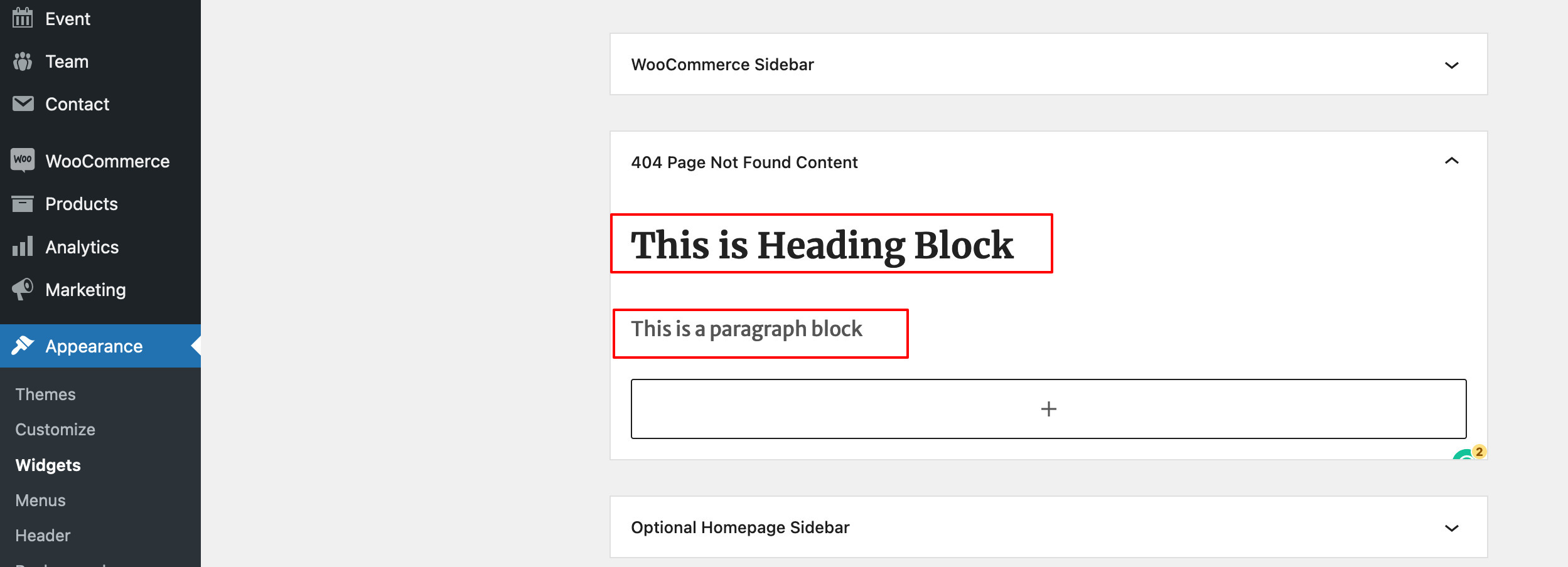
The site toerfietsleusden.nl is using a theme 404 template file 404.php inside the ‘travelore-pro’ folder which you can use the translation plugin to translate the 404.php file strings or use 404 sidebar and add heading and paragraph block as per your need. Also, I see that you have enabled Header Media. So, if you want to use the widget then you need to hide the header media text by adding the following CSS in the “Appearance => Customize => Additional CSS” box:
.error404 .header-media { display: none; }I see that now, you have removed the server 404 from routes.toerfietsleusden.nl and it’s also using the 404 templates. So, you can do the same with it as well.
Regards,
SakinSakinKeymaster@matigka : It should work fine with Elementor Builder. Also, you can download our free plugin “Page Builder Companion” to work with Page builder.
SakinKeymasterHi Hans,
The site https://routes.toerfietsleusden.nl/. Login to your server’s main root folder where you should be default server HTML files like 404.html you need to delete that. You can ask your hosting server support team to find that file.
About the site http://toerfietsleusden.nl/. It is Forbidden for me and I am checking the site from California, US.
Regards,
SakinSakinKeymaster@matigka : You can also download the Euphony theme demo import zip file from Theme Instructions tab on theme page at https://catchthemes.com/themes/euphony/#theme-instructions
SakinKeymaster@matigka: You can also download the Solid Constructions demo zip file from theme instructions tab on the theme page at https://catchthemes.com/themes/solid-construction/#theme-instructions
SakinKeymasterHi Hans,
Can you share your screenshot from google drive as you did before the URL you shared with me looks like private and not accessible? Also, the URL https://routes.toerfietsleusden.nl/ has its own 404.html file on your server, see this https://routes.toerfietsleusden.nl/404.html. This is not from the theme. If you delete that file then you will see the theme 404 page.
Regards,
SakinSakinKeymasterHi Hans,
I cannot see your screenshot. Something wrong with the shared URL. So, can you send me your site URL where you are having issue so that I can check what you are doing?
Regards,
SakinSakinKeymasterHello Hans,
In Gutenberg, you can use the Heading block and then the Paragraph block. See this screenshot widget.
 SakinKeymaster
Hello Hans,
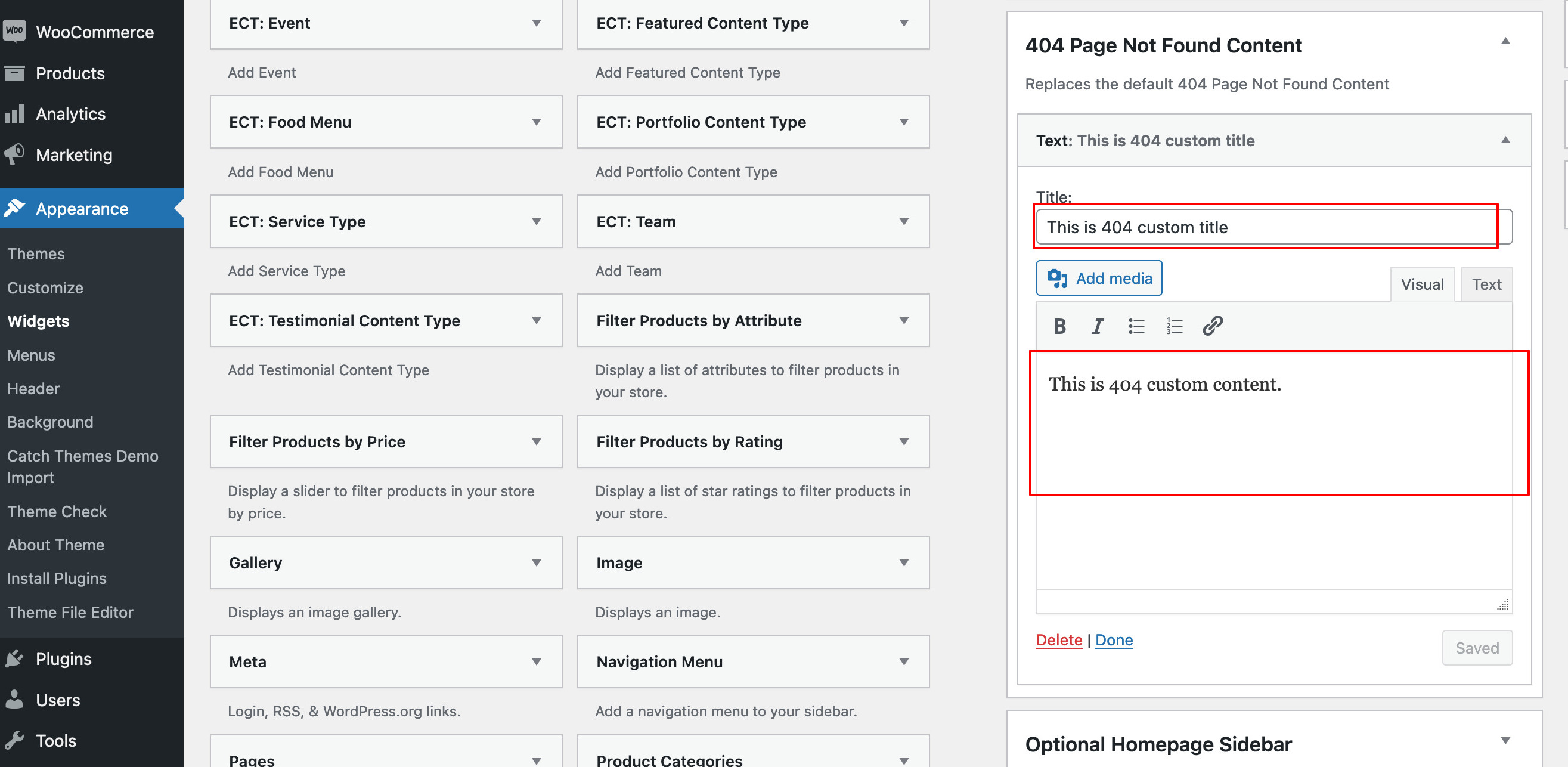
You can change both title and content from the widget. Just update the widget title and the 404 page title will be updated.
See this screenshot of widget
SakinKeymaster@bobgarretthomenetworks-co-uk: Sorry for the late reply, looks like we missed this topic. We usually reply within 24 hours. So, anyone, who didn’t hear us for more than 24 hours there must be an issue with your notification system just comment or contact us directly at https://catchthemes.com/contact-us/.
I don’t see a delay on your page title, can you tell me which page has that issue?
If you are talking about the padding-top for .custom-header then that delay is there due to the script to estimate the padding needed for fixed header .site-header. For that, you need to do a manual header padding-top as per your site and add the following CSS in the “Appearance => Customize => Additional CSS” box:
.custom-header {
 padding-top: 139px;
 transition-duration: 0s;
}
@media screen and (min-width: 480px) {
 .custom-header {
  padding-top: 203px;
 }
}
@media only screen and (min-width: 568px) {
 .custom-header {
  padding-top: 182px;
 }
}
@media only screen and (min-width: 742px) {
 .custom-header {
  padding-top: 139px;
 }
}
@media only screen and (min-width: 1024px) {
 .custom-header {
  padding-top: 153px;
 }
}
@media only screen and (min-width: 1200px) {
 .custom-header {
  padding-top: 214px;
 }
}
Regards,
SakinAugust 23, 2022 at 8:25 pm in reply to: Photofocus Pro – theme needs activation – license key does not work #309775SakinKeymasterDear Filip,
I will check that on our server. Also, make sure that you added the License key and not the Purchase Key. Please check this instruction https://catchthemes.com/faq/how-to-activate-license-key/ while I check it.
Regards,
SakinSakinKeymaster@intelharsh: It’s because of transparent .png images with space on it. For example, your first image https://harshrealitees.co/wp-content/uploads/2022/08/7044665117_1ea413c81c.png has left and right transparent background space. Same way, your second image https://harshrealitees.co/wp-content/uploads/2022/04/IMG_0018-1024×576.png also has left and right transparent background space. So, you need to use images without the spaces or just use .jpg images like https://harshrealitees.co/wp-content/uploads/2022/08/tumblr_7a37992e9daff951701c45843c1343ff_6e437ec1_500.jpg
SakinKeymaster@rek: Thanks for using the Catch Box Pro theme and you can add the following CSS in the “Appearance => Customize => Additional CSS” box:
.page .entry-header {
 display: none;
}
Regards,
SakinSakinKeymasterHi @twin6, Looks like there is an issue with the new block editor when you update to WordPress 5.9 or above. So, you might need to convert all your classic editor text to block. For that, you can use the Convert to Blocks plugin https://wordpress.org/plugins/convert-to-blocks/. But if you want to stay with the Classic Editor then you need to use the Classic Editor plugin https://wordpress.org/plugins/classic-editor/
SakinKeymasterHi @catwingz: For all these color, it would have better you upgrade to pro version.
About the header image on About Page, that header image is above the header and that was causing issue. So, if you want to add related to that page then you can add the following CSS in “Appearance => Customize => Additional CSS” box:
body.page-id-1746 #header-content.main-nav-scrolled {
 position: relative;
}
.page-id-1746 .site-header {
 margin-bottom: -87px;
}
Regards,
Sakin -
AuthorPosts