-
Search Results
-
I´ve been using the FULL FRAME theme for several years and It was working great but this month the Featured Slider stoped working . I´ve checked the configuration and it´s enabled.
The site is
http://www.ta.org.brHow can I fix it?
Thanks for your help
When I enable to demo version of the featured slider, it works fine – just under the menu and looks great. However, when I try any other option, such as posts, the slider appears over the top of my site title and menu. My website url is https://chemistrybook.co.uk/
Hello,
I have problem with section sorter. I update to new version and ” drag and drop” in section sorter doesn´t work. I would like delete grey overlay in Featured slider section also. How can I solve these problems ?
Thank you
Jana
Hello all,
Hope someone can help me here.
My site at https://davidyoungs.net has been up for ages using Catch Everest Free theme (thanks Catch Themes..)
Recently I tried to improve the page load / speed of the site using W3 Total Cache plugin. It certainly made things a bit faster but I noticed immediately that the home page slider and its content had vanished on the site (on both mobile and desktop browsers). Same for the ‘featured posts’ on the front page, which have details about my CDs / strings etc.
I deactivated and ultimately deleted W3TC, as soon as I deactivated it the desktop site returned 100% to normal with the slider posts and featured posts all correctly displayed. But when viewing on my mobile (Chrome Browser or native Samsung browser) the slider and featured post content is not displayed. The text which is below that content is all there a-OK.
Tried updating to very latest version of the theme, but still the same. Anyone got any ideas of how to fix this please?
Thanks in advance for any help!
DavidHi there,
I’m using Rock Star Free. The Featured Slider seems to crash/fail to load images every few days. The website will show the dots (normally) at the bottom, but no images. I have to go into theme customizer and reset the Featured Slider. Then it works fine for a few days…
Any idea what might be causing this?
startmeuprs.com
Thanks!
Hello, I resized featured images on all pages that are featured on the feature slider to 1320×566 as recommended. However, I still get a huge gap on the front page under the feature slider. After I click through all the slides, it adjusts to the proper height but this format glitch seems to make the slider unusable. Any suggestions on how to solve this problem? Thanks in advance.
First of all, thanks for your great work.
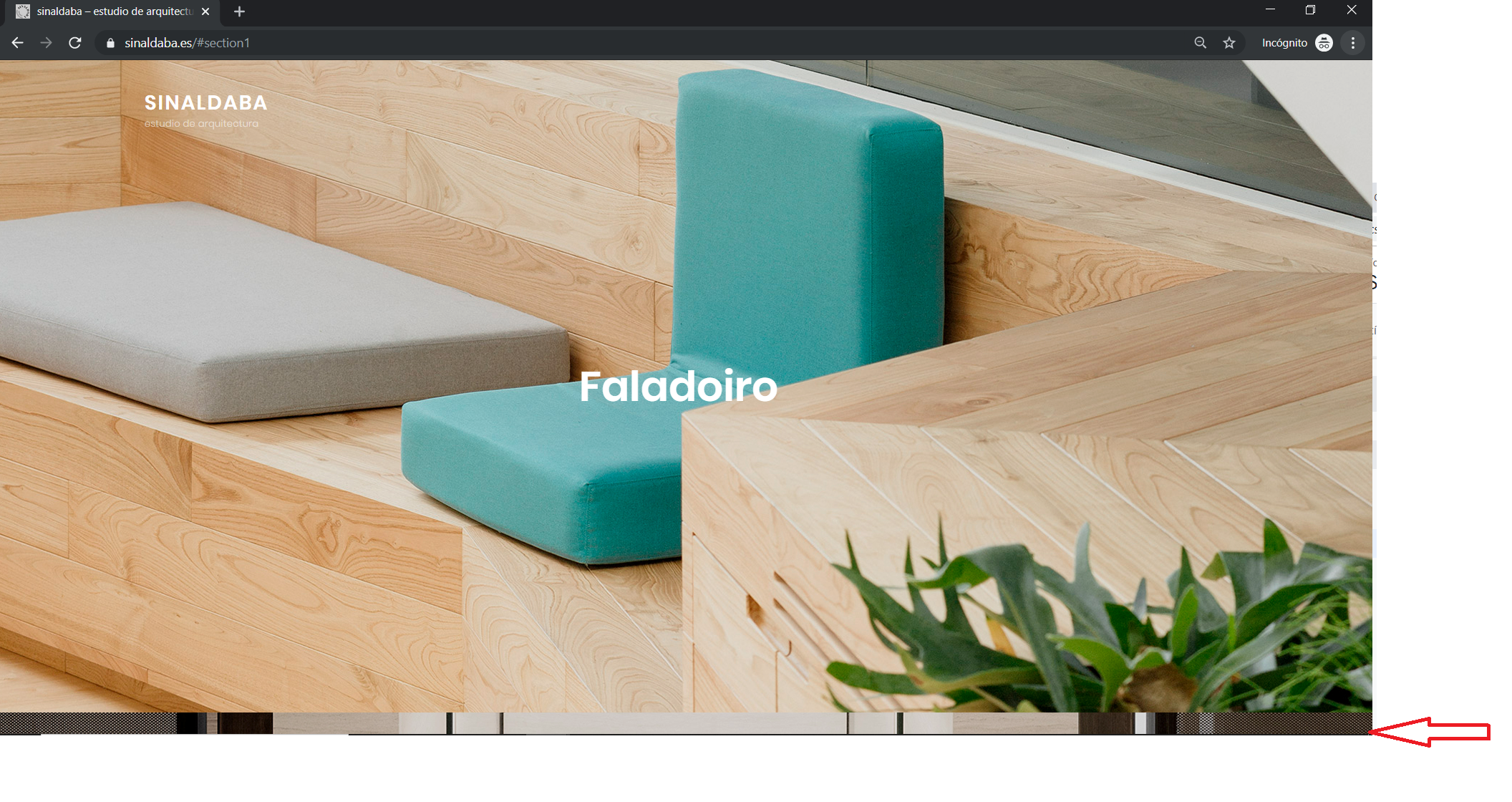
I’m trying to adapt your theme to my friend study https://www.sinaldaba.es
I’ve got an issue and I can’t find the solution: the first time I load my site, I can see the second at the bottom of the site
If I resize the window, I it fits ok…Can you help me? It’s like the image of #post2 is cropped and overlapping the #post1… so the #post1 background image does not all the height.
I’m triying hard to learn but I can’t get this work properly
http://www.sinaldaba.es/wp-content/uploads/2019/11/Catchfull-screen-bottom.png
Thanks in advance,
BrunoThis is the css personalization I made:
.entry-date {display:none;}

#search-toggle-right {display:none;}

.entry-meta{display:none;} .entry-meta{display:none;} .entry-date {display:none;}

#search-toggle-right {display:none;}

 .navigation-classic #search-toggle-right,

        #search-toggle.menu-toggle {

                display: none;

        }
.fluid-layout #header-content, .boxed-layout #header-content .wrapper,
.site-primary-menu.toggled-on,
#tertiary, footer-menu-wrapper,
.site-footer {
/* background-color: #2b2b2b;*/
margin: 2em 0em 2em 0em;
background-color:transparent;
border:none;
border-style:hidden;
border-image:none;
border-width:0px;
box-shadow: none;}
/*Remove flechitas*/
div#fp-nav.fp-right {display:none;}/*menu single post*/
.single-format-standard.wp-embed-responsive.ect-post.fluid-layout.navigation-classic.no-sidebar.content-width-layout.excerpt-image-top.primary-menu-left.no-header-media-text.site-primary-wrapper-menu-disabled.no-featured-slider.desktop-nav-on-page-right.mobile-nav-on-header div#page.site header#masthead.site-header div#header-wrapper div#header-content div.wrapper div.site-header-main div.site-branding
{text-align:center;margin-left:auto; margin-right:auto;
display:block;}.single-format-standard.wp-embed-responsive.ect-post.fluid-layout.navigation-classic.no-sidebar.content-width-layout.excerpt-image-top.primary-menu-left.no-header-media-text.site-primary-wrapper-menu-disabled.no-featured-slider.desktop-nav-on-page-right.mobile-nav-on-header div#page.site header#masthead.site-header div#header-wrapper div#header-content div.wrapper div.site-header-main div.site-branding div.site-identity p.site-title
{/*background-color:transparent;*/
background-image: url('/wp-content/uploads/2019/11/sinaldaba-arquitectos-logo-single-post-100x.png');
background-repeat: no-repeat;
/*background-size: cover;*/
background-position:center;
height:4em;
border:none;
border-style:hidden;
border-style:none;
box-sizing:content-box;
box-shadow: none;}
.single-format-standard.wp-embed-responsive.ect-post.fluid-layout.navigation-classic.no-sidebar.content-width-layout.excerpt-image-top.primary-menu-left.no-header-media-text.site-primary-wrapper-menu-disabled.no-featured-slider.desktop-nav-on-page-right.mobile-nav-on-header div#page.site header#masthead.site-header div#header-wrapper div#header-content div.wrapper div.site-header-main div.site-branding div.site-identity p.site-title a{color:transparent;}
/*single post site description*/
.single-format-standard.wp-embed-responsive.ect-post.fluid-layout.navigation-classic.no-sidebar.content-width-layout.excerpt-image-top.primary-menu-left.no-header-media-text.site-primary-wrapper-menu-disabled.no-featured-slider.desktop-nav-on-page-right.mobile-nav-on-header div#page.site header#masthead.site-header div#header-wrapper div#header-content div.wrapper div.site-header-main div.site-branding div.site-identity p.site-description{display: none;}/*esconder menú mobile*/
#header-content > div > div > div.site-primary-wrapper
{display:none;}/*sombra menu superior en single post*/
div#page.site header#masthead.site-header div#header-wrapper.header-top div#header-content div.wrapper div.site-header-main{border:none;border-style:none;}.fluid-layout #header-content, .boxed-layout #header-content .wrapper,
.site-primary-menu.toggled-on,
#tertiary, footer-menu-wrapper{border:none;border-style:hidden;border-style:none;}/*otros test*/
/*
#header-content {border-style:none;border:none;}
.fluid-layout #header-content, .boxed-layout #header-content .wrapper {
-webkit-box-shadow: 0px;
box-shadow: none;
}*/
Topic: Buttons and Sliders
I am revising the website at mattfurness.co.uk and would like to customise the buttons on the home page under the Promotion Headline and Featured Content sections. Probably looking to change the font and font colour, as well as colour on hover. Could you provide the CSS code for these buttons please as I believe they are different, for hover as well. I can then just insert the bits I need changing into Additional CSS. Thank you.
In addition, I have just purchased Catch Slider Pro as it includes a few attractive features. Having installed it on the site I am getting the message to update it to the latest version 1.4 when I am already on 1.4?? Secondly how does this work with the Rock Star Pro theme? As you can see I have a slider in place already, and I just assumed that once activated I would get additional features where I add the slider within the theme, but it appears I have to create a separate slider. How do I get this one to show on the site? Do I disable the one within the theme?
Many thanks, Chris
Hi
I’m trying to get the Title as well as the Content to appear on the “Custom” slider type but only the Content is showing over the images. I’ve also tried using “Posts” slider type but again the post title doesn’t show over the image, just the body text.
Have I missed a checkbox somewhere to enable this?
Thanks
Topic: featured slider
My featured slider turns white after it goes all the way around
https://cpaexamtutoring.com/

Premium Responsive WordPress Themes with advanced functionality and awesome support. Simple, Clean and Lightweight Responsive WordPress Themes