

Forum Replies Created
-
AuthorPosts
-
Sakin
KeymasterHello Andrew,
Looks like you are using the old version of the Catch Evolution Pro theme. So, please renew and update the theme to the latest version 4.2.1, and it should work fine.
Regards,
SakinKeymasterHello Leona,
The Photofocus Pro theme is fully supported. You can check the changelog at https://catchthemes.com/themes/photofocus-pro/#changelog. It was last updated on December 10, 2025. If you have any issue then do let us know, and we will fix it.
Regards,
SakinJanuary 6, 2026 at 6:12 am in reply to: I can’t access the customization page of Parallax Frame Pro #342451KeymasterHi José,
Thanks for informing, and glad to hear that it’s solved.
Regards,
SakinJanuary 6, 2026 at 2:56 am in reply to: I can’t access the customization page of Parallax Frame Pro #342449KeymasterHi José,
Thanks for using the Parallax Frame Pro theme. Our theme update shouldn’t be an issue with access to the theme customizer. Yes, you can use the theme as per your need until any update is needed in the PHP or WordPress core.
Can you add the plugin Query Monitor https://wordpress.org/plugins/query-monitor/ and check it?
Regards,
SakinKeymaster@rodeboy: Since you are not using multiple layouts on the homepage, can you just go to “Appearance => Customize => Theme Options => Fullpage Options” and in Scrollbar option, can you check “Check to enable Scroll bar Enabling the scrolling feature will automatically disable the parallax effect on iOS devices.“
Keymaster@kodendigital: It’s strange to see your screenshot like that. Have you tried to reverting back to version 2.1 and check it? You can see the diff from the track https://themes.trac.wordpress.org/changeset?old_path=alchemist/2.1&new_path=alchemist/2.2, it’s just the removal of the conditional script for Internet Explorer versions before 9 and WordPress 6.9 compatibility testing.
Keymaster@kodendigital: Can you post your site URL? Looks like you are confused about the theme. When I conducted a Google search for ‘Alchemist’ theme, I found another theme from ThemeForest as well. So, can you check if you are using our theme from WordPress.org that is https://wordpress.org/themes/alchemist/, or another theme? If you are using another theme, then you need to contact the theme author’s support.
KeymasterHello Charles,
Thanks for purchasing the BizBoost Pro theme. Looks like you tried to activate the product key instead of the license key. Please check this FAQ at https://catchthemes.com/fse-faq/#question-installation-and-update-block-themes-how-to-activate-theme-license-key
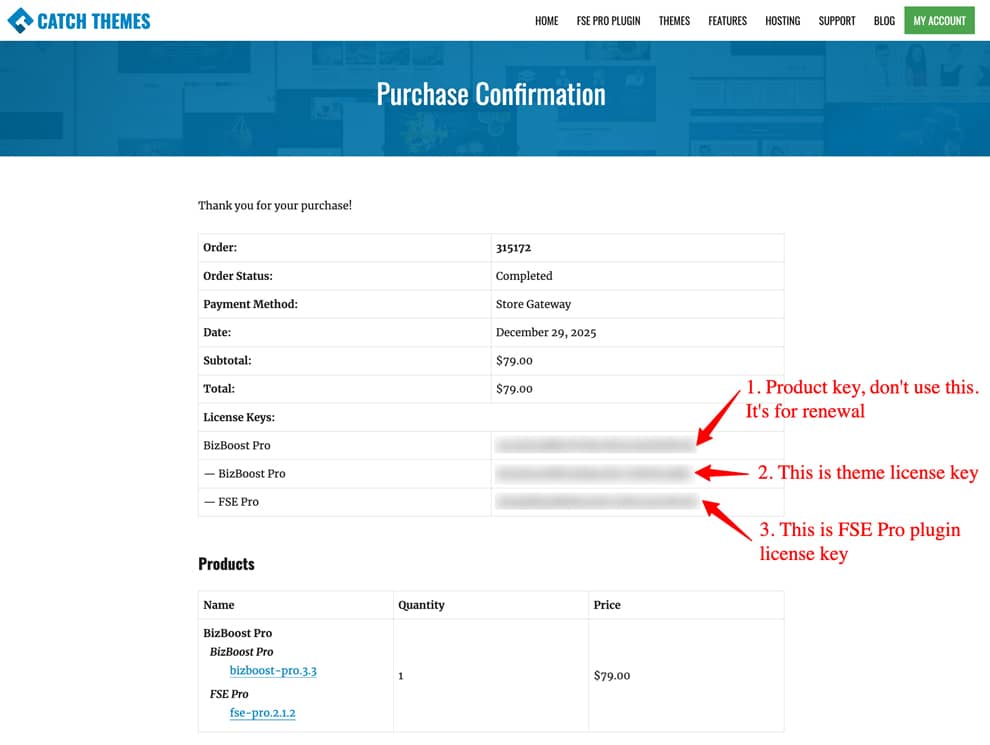
If you still have issues, then do let me know.
Regards,
SakinDecember 1, 2025 at 1:05 am in reply to: Request for License Activation: Fotografie Blocks Pro (Order #315094) #341687KeymasterHello Hanns,
Thanks for purchasing the Fotografie Blocks Pro. Yes, you will get 3 license keys.
1. Fotografie Blocks Pro: This is the parent license key, which you use only to renew the product.
2. Fotografie Blocks Pro: This is the theme license key that you need to use to activate the theme.
3. FSE Pro: This is used to activate the license key for the FSE Pro plugin.Please check this FAQ page, https://catchthemes.com/fse-faq/#question-installation-and-update-how-to-activate-license-key
If it still doesn’t work, then let me know, and I will contact you via email.
Regards,
SakinKeymaster@monika3151: You should be able to download the theme zip file from catchthemes.com/my-account/. Then, scroll down and check the “Downloads” section and click on “snowflakes-pro.2.0” to download the theme. Check the FAQ at https://catchthemes.com/frequently-asked-questions/#question-installation-how-to-install-themefor-pro-theme
November 22, 2025 at 8:37 am in reply to: My theme is activated but still asks for me to activate my Pro version #341610KeymasterHi Joseph,
On which site are you trying to activate it? Can you try to activate it now? If the problem persists, then I will contact you via email. Let me know.
Regards,
SakinKeymasterHi Glen,
This update message was added by our theme license software, and it was updated. On the latest version 3.5.1, we have added License Options in “Appearance => Customize => Theme Options”,from there you can disable that notification.
Regards,
SakinKeymasterHi Glen,
Yes, after the update from the subscription plugin, this is happening. It’s just a warning message that shows up there. I will check with the development team and send you an update.
Regards,
SakinKeymasterHi Michael,
Did you use the Parent License key or the product one? Parent is only used for renewal. You need to use the second one. Check this https://catchthemes.com/fse-faq/how-to-activate-license-key/.
I will also email you.
Regards,
SakinKeymasterHi Michael,
I checked on our server, and it shows it’s already activated. I will email you.
Regards,
SakinKeymasterHi Glen,
You can update to the Full Frame Pro theme, and then you can disable Header Toggle in Mobile from “Appearance => Theme Options => Fixed Header Top Options => Check to disable Header Toggle in Mobile”.
Regards,
SakinKeymasterHi Thorge,
It’s still there, it’s on the settings bar. See the screenshot below:
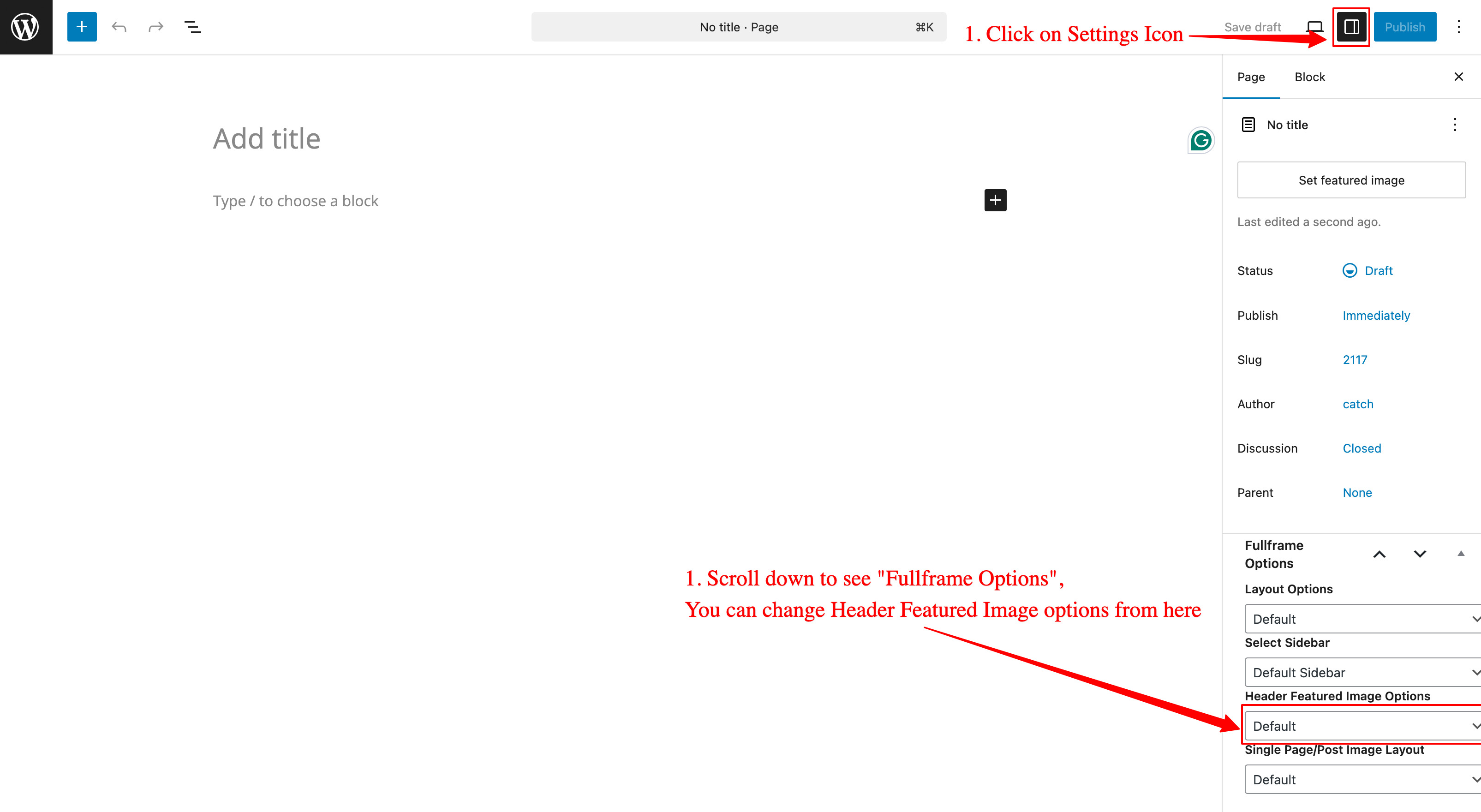
Regards,
SakinKeymasterHi Glen,
Yes, it was fixed in version 4.4.1 (Released: September 25, 2025). You can check the changelog at https://catchthemes.com/themes/full-frame-pro/#changelog . Please update the theme and clear your cache.
Regards,
SakinKeymaster@wouwonline: Looks like there is an issue with your child theme. Can you active the main theme Catch Kathmandu Pro and check it?
-
AuthorPosts