Forum Replies Created
-
AuthorPosts
-
 sujeetKeymaster
No worries at all! Glad you found the issue.
sujeetKeymasterHello @marcellot,
Thank you for the details. We’ll look into the license activation issue and get back to you soon.
Best regards,
SujeetsujeetKeymasterHello @marcellot,
Please make sure that your theme subscription has not expired. If it has expired, you will need to renew it to download the latest theme update.
Also, please ensure that your license key is activated on your website. Once activated, you should be able to update the theme directly from your WordPress dashboard.
For detailed instructions, please refer to the following guide:
https://catchthemes.com/faq/how-do-i-upgrade-to-a-new-theme-version-if-i-have-modified-my-theme/Please let me know if you continue to experience the issue, and I’ll be happy to assist you further.
Thank you!
Regards,
SujeetsujeetKeymasterHello @hotelprairie,
Hi, we’ve tested the theme with the latest PHP version and found no issues. The theme is updated and supported with WordPress 7.1. If you haven’t already, please update the theme to the latest version.
Could you please share the exact error you’re seeing, along with your current PHP version, so we can investigate further?
Thank you!
Regards,
SujeetSeptember 25, 2026 at 2:15 am in reply to: Adventurous theme, Gutenberg Grid and Excerpt text #344434sujeetKeymasterYou’re welcome! Hopefully the plugin author can help resolve the issue.
September 24, 2026 at 7:01 am in reply to: Adventurous theme, Gutenberg Grid and Excerpt text #344429sujeetKeymasterHello @bobgarretthomenetworks-co-uk,
Yes, this is likely caused by WordPress/Gutenberg’s automatic excerpt processing, which strips line breaks from the original post content.
For now, you can try the following CSS to move the ‘Continue Reading’ link to a new line.
Please add the following CSS under Dashboard > Appearance > Customizer > Additional CSS:
.wp-block-latest-posts__list .wp-block-latest-posts__post-excerpt .more-link {
   display: block;
   margin-top: 10px;
}
Please let me know if this helps. Thank you!
Regards,
SujeetsujeetKeymasterYou’re very welcome! Glad I could help.
sujeetKeymasterHello @bobgarretthomenetworks-co-uk,
Please try adding the following padding value and adjust it as needed. The height of the image is controlled by the padding, so you can increase or decrease the values to achieve the desired height.
Please add the following CSS to Dashboard > Appearance > Customizer > Additional CSS:
@media only screen and (min-width: 64em) {
   .has-header-media.header-media-text-disabled .wp-custom-header {
   padding: 230px 50px !important;
 }
}
Let me know if this works for you or if you need any further adjustments.
Thank you!
Regards,
SujeetsujeetKeymasterHi @tomdkat,
Hi! Sorry to hear you’ve been sick. Hope you’re feeling better now!
You’re very welcome, and glad the WordPress update went well!
Regards,
SujeetsujeetKeymasterHi @tomdkat,
Thank you for reaching out.
Yes, PhotoFocus Pro is compatible with WordPress 7.1, so you can proceed with the WordPress update.
Please feel free to reach out if you have any questions or need any assistance.
Regards,
SujeetAugust 19, 2026 at 8:16 am in reply to: Social icon not working after theme upgrade from 3.8.2 to 4.0.3 #344233sujeetKeymasterGlad to hear the issue is fixed! Thanks for letting me know, Alexis.
Regards,
SujeetsujeetKeymasterHello @alex-morgan-21,
Thank you for reaching out.
To help us identify the issue with the text displaying incorrectly, could you please send us your website URL along with a screenshot showing the exact text issue?
This will allow us to inspect the issue and determine whether it may be related to the theme’s typography, styling, or custom CSS and provide you with the appropriate solution.
We look forward to hearing from you.
Regards,
SujeetsujeetKeymasterHello @zenkeran,
You’re welcome! Yes, you can also adjust the submenu icon position when it is opened.
You can change its position by adding values to left, right, top, or bottom in the CSS, depending on where you want the submenu icon to appear.
For example:
right: 45px;
top: 45px;Please try adding the following CSS code and adjust the values as needed:
.main-navigation #primary-menu .dropdown-toggle.active {
   right: 45px;
   top: 45px;
   z-index: 2;
}
You can change the right and top values to move the submenu icon to your preferred position. You can also use left or bottom if that works better for your layout.
Hope this helps! Thank you.
Regards,
SujeetsujeetKeymasterHello,
For better website speed, optimize your images, use a caching plugin, reduce unnecessary CSS and JavaScript, and remove unused plugins. Keep your WordPress, theme, and plugins updated. You can also use tools like Google PageSpeed Insights to find and fix performance issues. Thank you.
Regards
sujeetKeymasterHello @zenkeran,
Yes, you can achieve this using CSS. Please add the following css to Dashboard > Appearance > Customizer > Additional CSS.
.menu-wrapper .main-navigation #primary-menu .dropdown-toggle:not(.active) {
   top: 50%;
   transform: translateY(-50%);
   z-index: 2;
}

.main-navigation #primary-menu .dropdown-toggle:after {
   font-size: 40px;
}
Could you please clarify how you would like to change the position of the submenu icon in the mobile view?
Once you confirm the desired position, we can provide the appropriate CSS.
Thank you.
Regards,
SujeetsujeetKeymasterHello @inna,
We sincerely apologize for the confusion regarding the Fotografie Pro theme license.
Yes, the Fotografie Pro license includes one year of updates from the date of purchase. Since your theme was purchased on 24 March 2025, the license expired on 24 March 2026, which is why you are now seeing the renewal notice in your WordPress dashboard.
To update your theme to the latest version and continue receiving updates, you will need to renew the license.
Thank you for your understanding, and we apologize again for the inconvenience.
Regards,
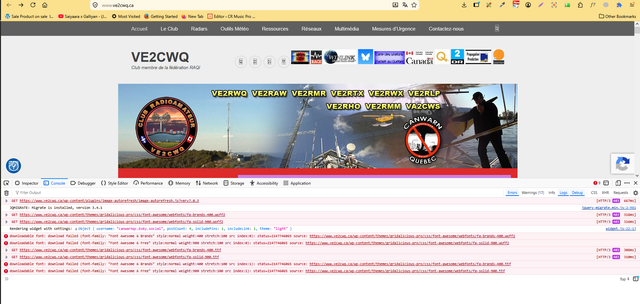
SujeetAugust 10, 2026 at 4:17 am in reply to: Social icon not working after theme upgrade from 3.8.2 to 4.0.3 #344164sujeetKeymasterHello @ve2cwq,
Thank you for providing the details.
We checked the issue and found that the social links are working correctly, but the Font Awesome icons are not loading on the live site, which is why they appear as empty circles.
Since the icons work correctly locally, the issue appears to be related to how the font files are being served on the live server. We recommend contacting your hosting provider to check if any server settings, security rules, or permissions are preventing the Font Awesome font files from loading.
You can also share the browser console error with your hosting provider so they can investigate the issue from the server side.

Please let us know what you hear back from your hosting provider, and we’ll be happy to assist further.
Regards,
SujeetsujeetKeymasterNo problem at all! Glad you found the issue. Thanks for letting us know, and feel free to reach out if you need anything else.
sujeetKeymasterHello,
Since you are unable to access the WordPress admin area, we recommend reaching out to your web hosting provider. They should be able to review the server error logs and help identify the exact cause of the critical error.
They may be able to confirm whether the issue is caused by a PHP compatibility problem, a plugin conflict, or another server-side issue.
Thank you.
Regards,
Sujeet -
AuthorPosts