Viewing 6 posts - 1 through 6 (of 6 total)
  • Author
    Posts
  • #343039

    How can I change how much posts are displayed in a row in the blog style grid?

    #343043
    Sakin
    Keymaster

    @zenkeran: It will display the blog post in 2 rows, and for the number of posts, you can change it from “Settings => Readings” and change “Blog pages show at most”.

    #343053

    I mean the number of rows (change from 2 to 3).

    #343064
    sujeet
    Keymaster

    Hello @zenkeran,

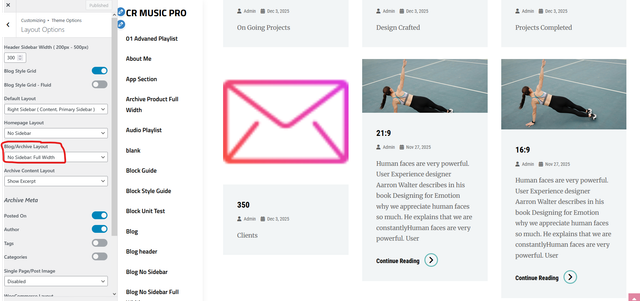
    To display 3 columns instead of 2 in the Blog Grid layout, you will need to set the Blog/Archive Layout to No Sidebar Full Width. When the sidebar is enabled, the available content area becomes narrower, which is why the grid only shows two columns. Using the full-width layout provides enough space for three columns.

    Please follow the steps below:

    Got to Dashboard => Appearance => Customize => Theme Options => Layout Options => Blog/Archive Layout

    After switching to the No Sidebar Full Width layout, the blog grid should automatically display 3 columns instead of 2.

    You can also check the screenshot below for reference:

    grid-blog

    Please try this and let me know if it works for you. Thank you.

    Regards,
    Sujeet

    #343066

    Hello Sujeet,

    Thank you for your reply. That will help me.

    Kind regards
    André

    #343070
    sujeet
    Keymaster

    Let me know if you need any further help. Thank you.

    Regards,
    Sujeet

Viewing 6 posts - 1 through 6 (of 6 total)
  • You must be logged in to reply to this topic.