Viewing 8 posts - 1 through 8 (of 8 total)
  • Author
    Posts
  • #342954
    HansH
    Member

    Hello team,

    After a year or so we got new team clothes. I wanted to replace the header image by an image with the term in new clothes. The old image had not problems, the new image is too high and too unsharp or blurry
    On the phone and the iPad all is ok, but the image on the desktop (iMac) is much too high and is not sharp.
    I tried to make the image less hight, but that isn’t a solution. The image becomes more blurry.
    Can anyone help me to solve this problem?

    The website is https://www.toerfietsleusden.nl

    Thank you in advance
    Kind regards

    Hans Hagmeijer

    #342964
    minal
    Keymaster

    Hello @HansH:

    Congratulations on your team’s clothes!

    Regarding your image, it appears the resolution is quite low. That’s why it looks fine on smaller devices but appears blurry on desktops. Try uploading a higher resolution version and check again, it should improve the clarity.

    Sincerely,

    Minal

    #342965
    HansH
    Member

    Hello Minal,

    Thank you for the compliment and the answer. I will try to find another image with a higher resolution. Problem is, that the pictures were made by telephone.
    Is there a possibility to make the image less high?
    Now I solved the problem partly by making the width smaller, but what I should like is the full width.
    If not: no problem.


    Kind regards

    Hans Hagmeijer


    #342966
    HansH
    Member

    Hello Minal,

    I changed resolution from 72 to 100. I reduced the height of the image to 325 pixels. The original header also had 395 pixels.
    The result is that the website doesn’t show 3the height of 395 pixels but much more with a blurry result.

    Nou I changed the format in 960 with.

    How is it possible to get a height of 395 pixels and a full width. Can you please give me a clue?


    Kind regards


    Hans Hagmeijer

    #342967
    minal
    Keymaster

    Hello @HansH:

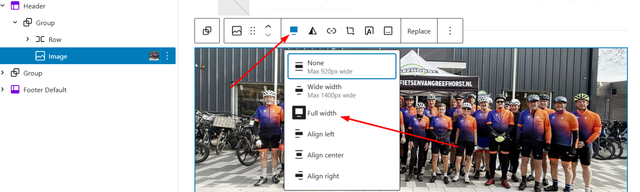
    You have to change the width from wide to full width in the editor for a full-width. Right now it has wide width selected.

    Check the screenshot below:

    Screenshot

    You need to use an image with a width of 1920px. If you enlarge a low resolution image, it will become blurry because it loses quality when scaled up.


    Sincerely,
    Minal

    #342973
    HansH
    Member

    Thank you Minal,

    I will try this. I think it will be allright. Your explanation is clear as always.


    Kind regards


    Hans Hagmeijer

    #342974
    HansH
    Member

    Hello Minal,


    Thanks for your help. With the available images (made in portrait and not in landscape) and your help I have a best and reasonable result.


    Kind regards


    Hans Hagmeijer

    #343030
    minal
    Keymaster

    Hello @Hans:

    I’m glad to hear that you resolved the issue by yourself. Please feel free to reach out if you need any further assistance.

    Sincerely,

    Minal

Viewing 8 posts - 1 through 8 (of 8 total)
  • You must be logged in to reply to this topic.