
- This topic has 1 reply, 2 voices, and was last updated 13 hours, 5 minutes ago by
 sujeet.

-
AuthorPosts
-
November 4, 2026 at 1:16 pm #344800
 Janine MöllenbergParticipant
Website: acoustic-solutions.de
WordPress Theme: Rock Tune Pro (Version 2.7)
Plugin: FSE Pro (Version 2.5)
Browser: Google Chrome on macOS
Description of the problem
I would like to keep the slider on my homepage, including the navigation arrows, but disable automatic image rotation. The images should remain static until a visitor manually clicks the navigation arrows.Unfortunately, the slider continues to change images automatically, even though I have disabled the autoplay option.
Troubleshooting steps already performed
I have already tried the following:- Disabled the “Enable autoplay” option in the FSE Pro Slider block settings.
- Saved the changes in the WordPress editor.
- Tested the website in a Chrome Incognito window to rule out browser caching.
- Updated FSE Pro to version 2.5.
- Updated Rock Tune Pro to version 2.7.
- Checked the slider settings and the available theme options.
Despite these steps, the automatic image rotation continues.
I also noticed that the slider pattern in the WordPress Site Editor cannot be edited directly and appears to offer only the option to duplicate it.
My questions
Could you please help me resolve this issue?- Is there another setting in Rock Tune Pro or FSE Pro that controls automatic slider rotation?
- Is this a known bug in the current versions of Rock Tune Pro or FSE Pro?
- Is there a way to disable autoplay permanently while keeping the slider and its navigation arrows?
- If necessary, could you provide instructions for a suitable workaround?
I would appreciate detailed instructions, as I have already tried the standard autoplay setting without success.
I can provide screenshots of the slider settings and the WordPress editor if needed.
Thank you very much for your time and assistance.
I look forward to your response.
Kind regards,
JanineNovember 5, 2026 at 12:18 am #344803sujeetKeymasterHi Janine,
Thank you for providing the detailed information about the issue and the troubleshooting steps you have already performed.
We have checked the theme and the FSE Pro Slider block, and the autoplay settings appear to be working correctly on our end. We haven’t been able to see the issue so far.
To investigate this further, we would like you to try the following steps:
1. Check for Plugin Conflicts
There may be a conflict with another plugin installed on your website. Please follow these steps:
– Temporarily deactivate all plugins except FSE Pro.
– Check whether the slider autoplay issue is resolved.
– If it works correctly, start activating the other plugins one by one.
– After activating each plugin, check the slider again to identify whether a particular plugin is causing the conflict.
This will help us identify if another plugin is interfering with the slider functionality.
2. Could you please share the following with us?
– A screenshot of the FSE Pro Slider block settings, particularly the autoplay option.
– A screenshot of the slider in the WordPress editor.
These details will help us understand your current setup and investigate the issue more effectively.
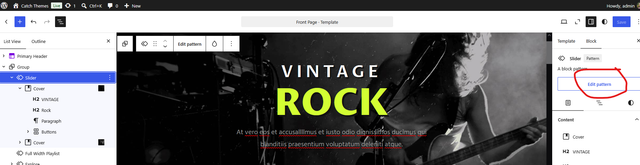
3. How to Edit the Slider Pattern
Regarding your question about editing the slider pattern, you can edit an existing pattern directly from the WordPress Site Editor.
To do so:
– Open the WordPress Site Editor.
– Navigate to the page or template where the slider pattern is used.
– Select the slider pattern.
– Look for the Edit Pattern option in the right-hand sidebar.
– Click Edit Pattern to access and modify the pattern’s content.
Please refer to the attached screenshot for guidance.

Once we receive the requested screenshots and the results of the plugin conflict test, we can investigate this further and help you find a suitable solution.
Thank you for your patience and cooperation. We look forward to hearing from you.
Regards,
Sujeet -
AuthorPosts


- You must be logged in to reply to this topic.