
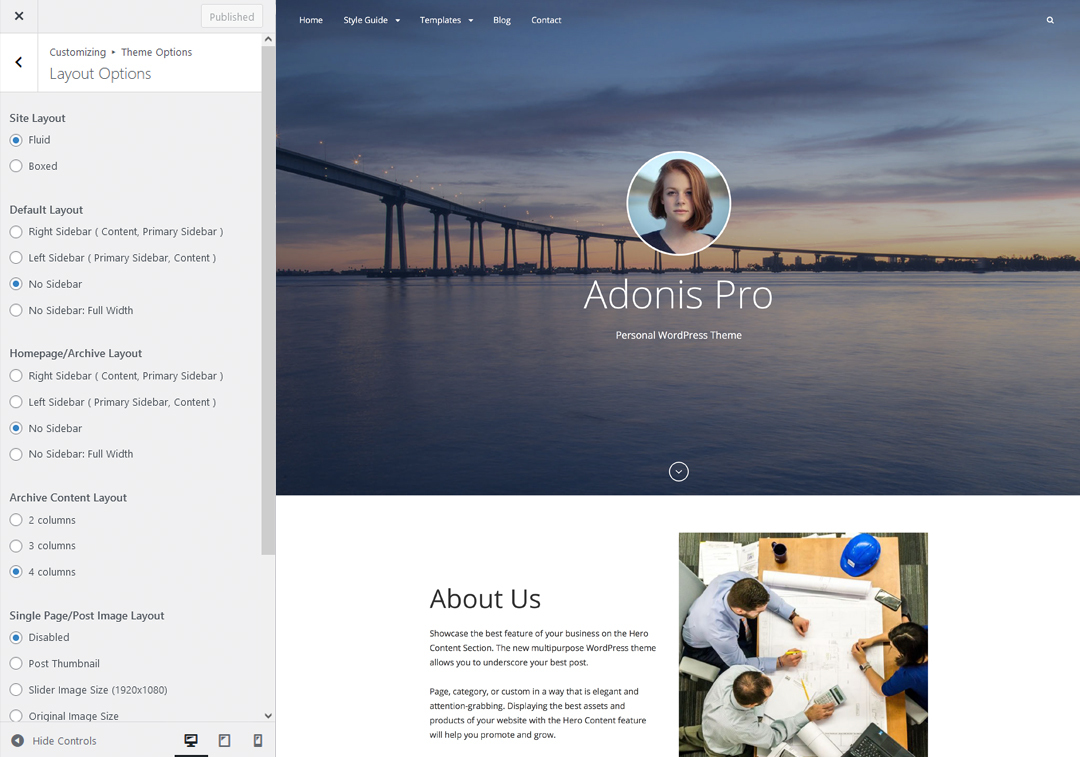
Note: Screenshot is only for reference, options may differ according to used themes
Our Premium themes has 2 Site Layout, 4 Default Layout, 4 Homepage/Archive Layout, 3 Archive Content Layout, 3 Single Page/Post Image and 4 Woocommerce Layout options image layout to choose from “Appearance => Customize => Theme Options => Layout Options”
Site Layout
Once you are in Layout Options, you can Check the option below “Site Layout” which will set your site layout.
Default Layout
Once you are in Layout Options, you can Check the box below “Default Layout Options” which will set our site layout. Further, you have the choice of selecting custom layout for individual pages and posts through “(Theme name) Options => Layout Options”, which you shall find below individual posts and pages, when you click on them for adding/editing
Archive Content Layout
Once you are in Layout Options, you can Check the box below “Archive Content Layout” which will set our layout for Archive Page. Further, you have the choice of selecting custom layout for individual pages and posts through “(Theme name) Options => Layout Options”, which you shall find below individual posts and pages, when you click on them for adding/editing
Single Page/Post Image Layout
Once you are in Layout Options, you can Check the box below “Single Page/Post Image Layout” which will set our posts/page image layout. Further, you have the choice of selecting Single Page/Post Image Layout for individual pages and posts through “(Theme name)Options => Single Page/Post Image Layout”, which you shall find below individual posts and pages, when you click on them for adding/editing.
WooCommerce Layout
Select layout for your WooCommerce pages. Option to choose from 4 Layout Options: i. Left Sidebar(Primary Sidebar,Content), ii. No Sidebar, iii. No Sidebar:Full Width and iv. Right Sidebar(Content,Primary Sidebar)